
Home  >  News

November 3, 2026      News      3DPTimes | English adaptation of a supplied Chinese manuscript, with product details reviewed November 3, 2026.      23

Six developments span the Ender-3 V3 Mega, Siraya Tech support filaments, glue-free PLA joints, Meshy Edit, Morpho UV printing and MakerLab’s Stamp Maker.

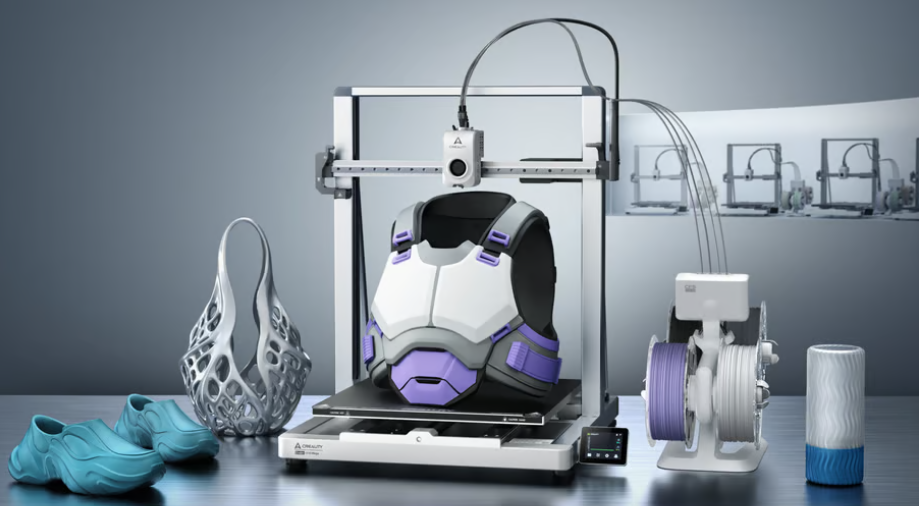
Creality Ender-3 V3 Mega shown with large printed objects. Image: Creality, supplied with the authorized manuscript.
This edition brings together six hardware, materials, research and software developments. Several were announced in October or earlier; this is a curated roundup, not a claim that all six launched today.

1. Ender-3 V3 Mega: more room for large and flexible prints

Creality’s Ender-3 V3 Mega offers a 420 × 420 × 420 mm build volume, giving makers more room for large models and batch production. Projects that fit within that envelope may be printed in one piece, reducing assembly and visible seams.

Creality specifies a typical speed of 300 mm/s and advertises a maximum of 500 mm/s. A reinforced metal frame, dual Y motors, dual Z motors and vibration compensation support the larger moving platform. The Sprite 2 direct-drive system is intended for flexible materials, including TPU rated from 85A to 95A.

Automatic leveling and a quick-release nozzle simplify setup and maintenance. File transfer options include a USB drive, Wi-Fi and Creality Cloud. The Combo adds CFS nano for automatic four-color switching and compatible RFID filament recognition. TPU must be fed directly into the Mega Combo: it cannot use CFS nano’s filament-relay path.

Source: Creality official product page and October 22, 2026 product overview; reviewed November 3, 2026.
https://www.creality.com/products/ender-3-v3-mega

Creality Ender-3 V3 Mega shown with large printed objects. Image: Creality, supplied with the authorized manuscript.
2. Siraya Tech: breakaway supports matched to the model material

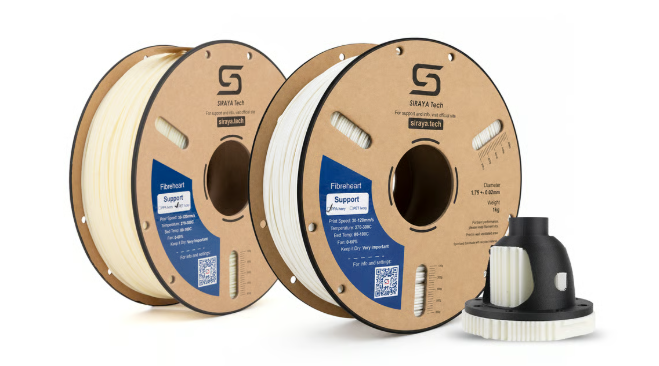
Siraya Tech’s Support PET Ivory and Support PPA Ivory address a familiar problem: removing support structures without damaging the surface underneath. The supplied manuscript lists 1 kg spools and historical US prices of $49.99 and $59.99 respectively; those figures should not be read as guaranteed current prices.

The manufacturer’s guides distinguish the material families. Support PET is intended for PET, ABS, ASA, PPS, TPU and PA12, including reinforced variants. It is not the support choice for PA6 or PPA. Support PPA targets PPA and PA6 formulations, with Siraya warning that it does not work well with PA12.

Recommended nozzle ranges are 260–280°C for Support PET and 270–300°C for Support PPA. The guides describe zero vertical support gap, suitable high-temperature extrusion hardware and material-change purging to clear heat-aged material. These are starting points for tuning, not universal settings. For annealed parts, the supports can remain in place during treatment and be removed after cooling.

Sources: Siraya Tech official PET Ivory and PPA Ivory user guides, reviewed November 3, 2026.
https://siraya.tech/pages/support-filament-for-pet-ivory-user-guide
https://siraya.tech/pages/support-filament-ppa-ivory-user-guide

Siraya Tech support-filament spools and a supported example part. Image: Siraya Tech, supplied with the authorized manuscript.
3. C-shaped joints: a useful result with a clear strength limit

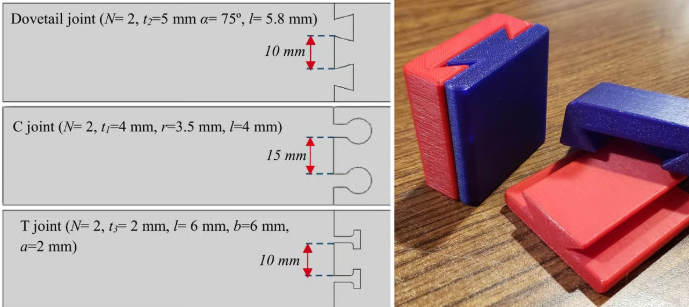
The research summarized in the supplied manuscript compares dovetail, C-shaped and T-shaped interlocking PLA joints inspired by Japanese joinery. Researchers at the University of Galway and Atlantic Technological University reportedly printed 135 test assemblies on a Prusa MK4 while varying joint dimensions and the number of interlocking features.

The reported best C-shaped configuration used a 5 mm neck and reached about 7 MPa in tensile testing. Increasing the neck to 7 mm did not improve the result, and adding interlocks did not consistently increase strength.

The important qualification is the reference specimen: continuous PLA reached 44.4 MPa. The strongest tested joint therefore achieved only about 16% of that strength. This is guidance for a tested geometry under tensile loading, not evidence that C-shaped joints are universally strongest or ready to replace every fastener.

Research reference supplied with the report: Reynolds, Sam-Daliri, Jiang and Ghabezi, “Design for assembly of 3D-printed structures using joinery-inspired interlocking joints,” Results in Engineering, 2026.
https://doi.org/10.1016/j.rineng.2026.113437

Joint geometries and a printed dovetail example reproduced from the supplied manuscript. Image credit in the original material: study illustration and Ristow Designs / Printables, via All3DP.

4. Meshy Edit: change a selected region with a prompt

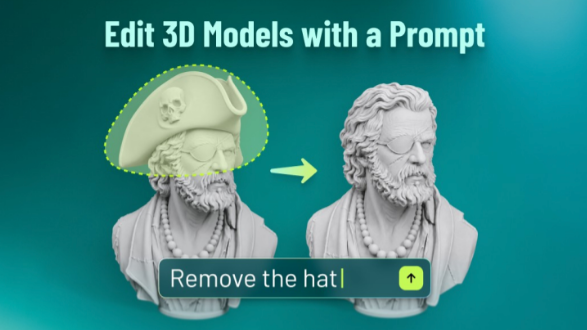
Meshy Edit adds local editing to the company’s 3D-modeling workflow. Instead of regenerating an entire asset, users select a region and describe what to add, remove or replace. Each edit creates a new version while retaining the original.

The October 16, 2026 announcement describes lasso and brush selection, with up to five reference images per edit. Wearable accessories such as hats and glasses are among the more reliable examples, while substantial shape changes can require several attempts. Processing time and results vary; a one-minute turnaround should not be treated as a guarantee.

The initial release changes geometry rather than textures. Meshy’s documentation identifies support for high-poly drafts generated with Meshy 6 or 7.1, with exclusions for externally uploaded, textured, rigged or still-generating assets. Generated geometry still needs the usual inspection before slicing and printing.

Source: Meshy, “Meshy Edit: Edit Your 3D Model with Words,” October 16, 2026; documentation reviewed November 3, 2026.
https://www.meshy.ai/blog/meshy-edit

Meshy’s local-editing demonstration removes a hat from a digital bust. This is a software/model illustration, not a photograph of a printed result. Image: Meshy, supplied with the authorized manuscript.
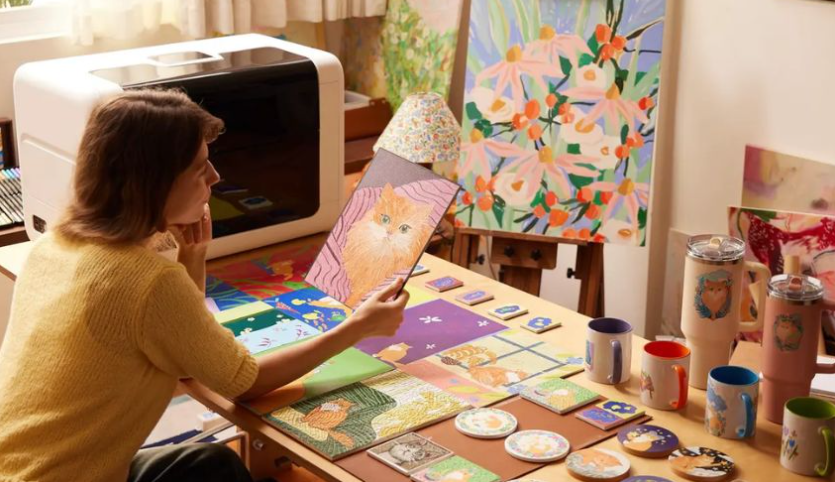
5. Morpho: desktop UV printing for color and raised textures

Morpho applies UV-cured ink to existing objects such as wood, glass and metal, adding color and tactile relief rather than simply building a conventional FDM part from scratch. Its moving-gantry design combines a stationary work area with camera-based alignment and built-in color measurement.

The company lists an enclosed work envelope of 330 × 220 × 168 mm. The Standard model uses an F1080 printhead, six ink channels, up to 1,440 dpi and up to 5 mm of raised texture. The Pro uses an i3200 head, eight channels, up to 2,400 dpi and up to 60 mm of texture stacking. These are manufacturer specifications.

Morpho’s website lists MSRPs of $2,699 and $4,999, distinct from the displayed Kickstarter prices of $2,159 and $3,999. It also reports more than $10 million raised from nearly 3,000 backers. The campaign ran from August 20 to October 14, 2026, so the manuscript’s “ends today” wording is outdated. Its original December 2026–January 2027 factory-shipping estimate should also be treated as a historical target, not a confirmed delivery promise.

Sources: Morpho official specifications and campaign FAQ, reviewed November 3, 2026; company launch announcement, August 21, 2026.
https://morpho.inc/
https://www.kickstarter.com/projects/morpho-inc/morpho-desktop-uv-printer/faqs

Morpho’s desktop UV printer shown in a creative-workspace promotional image. Image: Morpho, supplied with the authorized manuscript.

6. Stamp Maker: browser-based design for printable stamps

Stamp Maker, a third-party tool offered through Bambu Lab’s MakerLab platform, combines text, SVG artwork and geometric shapes into printable stamp designs. Users can adjust the stamp plate, body and handle, with a millimeter-based layout and a 3D preview.

The supplied report describes curved text, raised or recessed designs, separate component colors and threaded or bayonet-style handle connections. STL and 3MF exports support downstream print preparation; 3MF can retain color information. Projects can also be saved as JSON.

Basic functions are free. The reported one-time Pro upgrade adds custom TTF/OTF fonts, stamp plates shaped from SVG outlines and decorative borders. Projects using Pro features require Pro access for export. The developer provides the tool, while Bambu Lab supplies the platform; it should not be described as entirely developed by Bambu Lab.

Tool reference: MakerLab community Stamp Maker. Feature summary translated from the supplied manuscript; platform access and current Pro terms should be checked directly.
https://makerworld.com/de/makerlab/community/stamp-maker

Printed stamp bodies and handles illustrate the Stamp Maker workflow. Image supplied with the authorized manuscript.

Editorial note: English translation and technical editing by 3DPTimes, November 3, 2026. Product claims remain attributed to their manufacturers; prices and crowdfunding timelines can change. Images were supplied with the authorized manuscript and are reproduced without alteration.


©2026 3dptimes.com All Rights Reserved